All your accounts in a single window.
Organize the sessions for sites and games you already use in one window. Each panel keeps its own local data without mixing logins or profiles.
How it works
From checkout to your first login
- 1
Create your account
Email or username and a password. Takes 30 seconds.
- 2
Buy the license
One-time payment. Pick how many computers you want to use.
- 3
Payment approved
As soon as the payment clears, the license is unlocked on your account.
- 4
Download the installer
The download sits in your client area, with the file’s SHA-256.
- 5
Install
A no-nonsense Windows installer. Next, next, finish.
- 6
Sign in with email and password
No serial, no activation key. Just your account.
- 7
First activation
Your computer is linked to the license automatically the first time.
- 8
Done
Open your accounts, arrange them into workspaces and get going.
Why Idle Labs
Built for people done juggling browser windows
Anyone running idle games or several accounts knows the pain: one browser with ten incognito profiles, another with sketchy extensions, everything bleeding together and logging you out at random. Idle Labs was built to fix that — every account in its own box, the way it should have been from the start.
Real isolation
Each account has its own cookies, cache and login. One never breaks another.
Everything in view
See all your accounts side by side and switch without losing context.
Your way
Workspaces, colors, icons and layouts. Set up the bench however you like.
Workspaces
Organize everything into categories
Workspaces
Group accounts by category — a workspace for each project, account or crew.
Flexible panels
Create the panels you need in each workspace, each with its own name, color and URL.
Layouts
Auto grid, single panel, columns, rows or a free layout by dragging panels around.
Independent sessions
Every account is a persistent, isolated session — its own login and cookies.
Performance
Heavy lifting, light footprint
One process per account
Each panel runs an isolated WebContentsView — if one hangs, the rest keep going.
Metrics on screen
Each account’s CPU and memory stay visible in the sidebar, in real time.
Light on purpose
In our test, 6 active accounts at 46 FPS using ~1.1 GB total. No melting your PC.
Per-account audio and zoom
Mute one account, zoom another. Fine-grained, individual control.
Security and license
Your account, your devices, under control
Email and password login
No serial, no key. You sign in with your account — simple, nothing to type.
License per device
Each computer is linked to your license on first activation, with a clear seat limit.
Manage devices
Switched PCs? Remove the old one from your client area and activate the new one.
Automatic updates
The app updates itself and shows what changed in each version, with integrity checks.
Responsible use
The app organizes sessions; it does not automate actions or capture credentials and must be used under each service’s rules.
Inside the app
Real screens, no dressing up
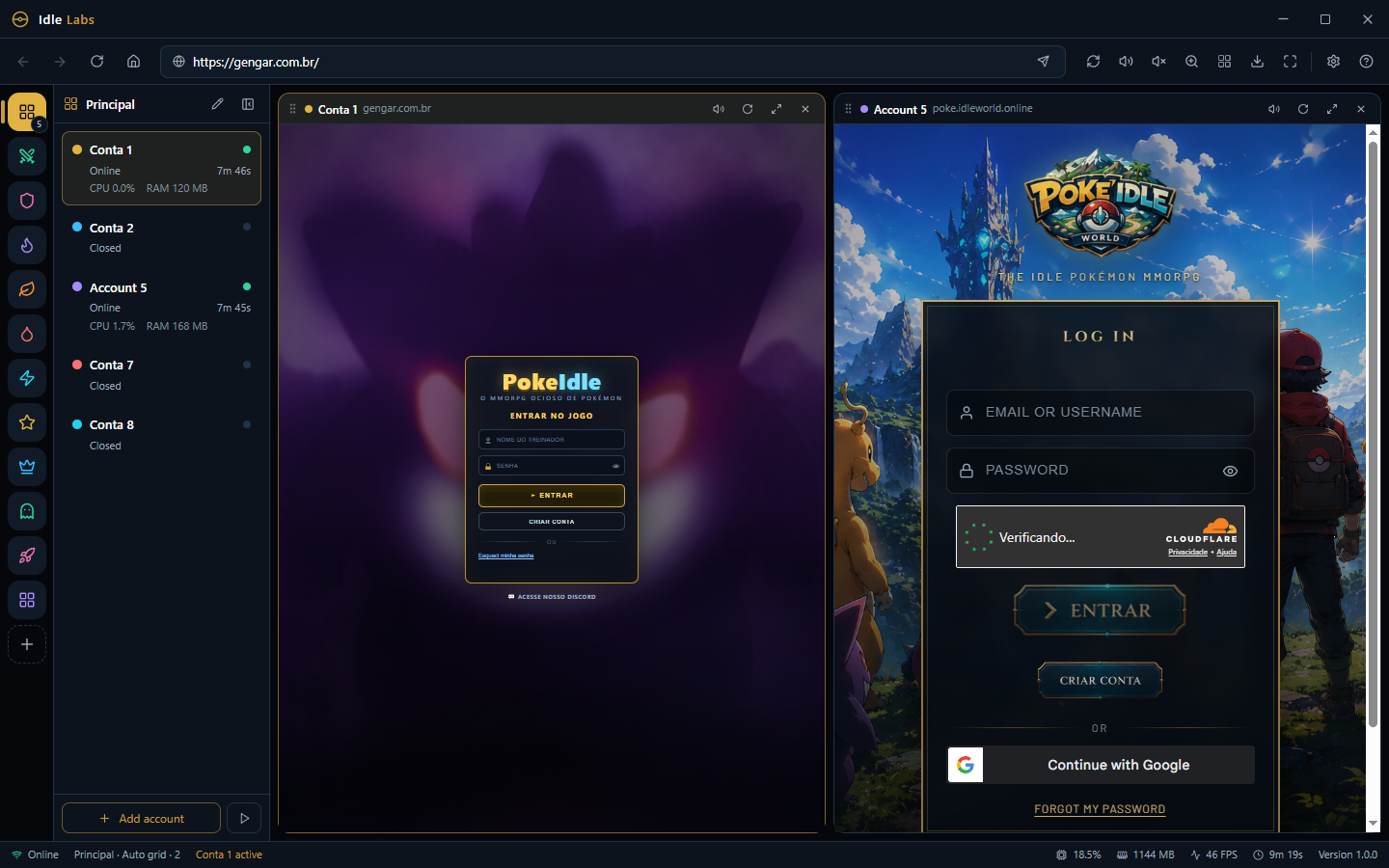
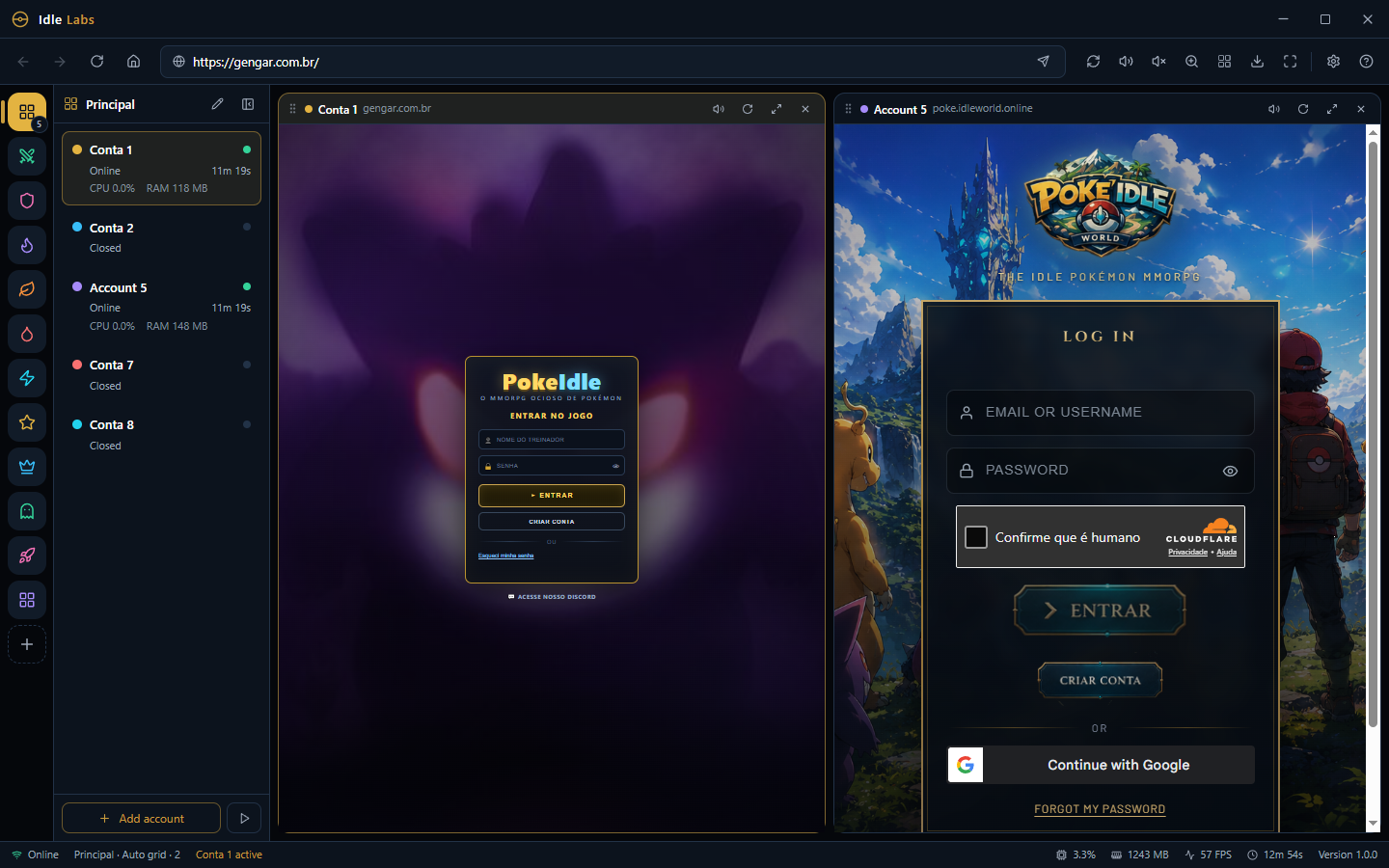
The main view: your accounts on the side, panels laid out side by side, and a status bar with FPS, memory and version.
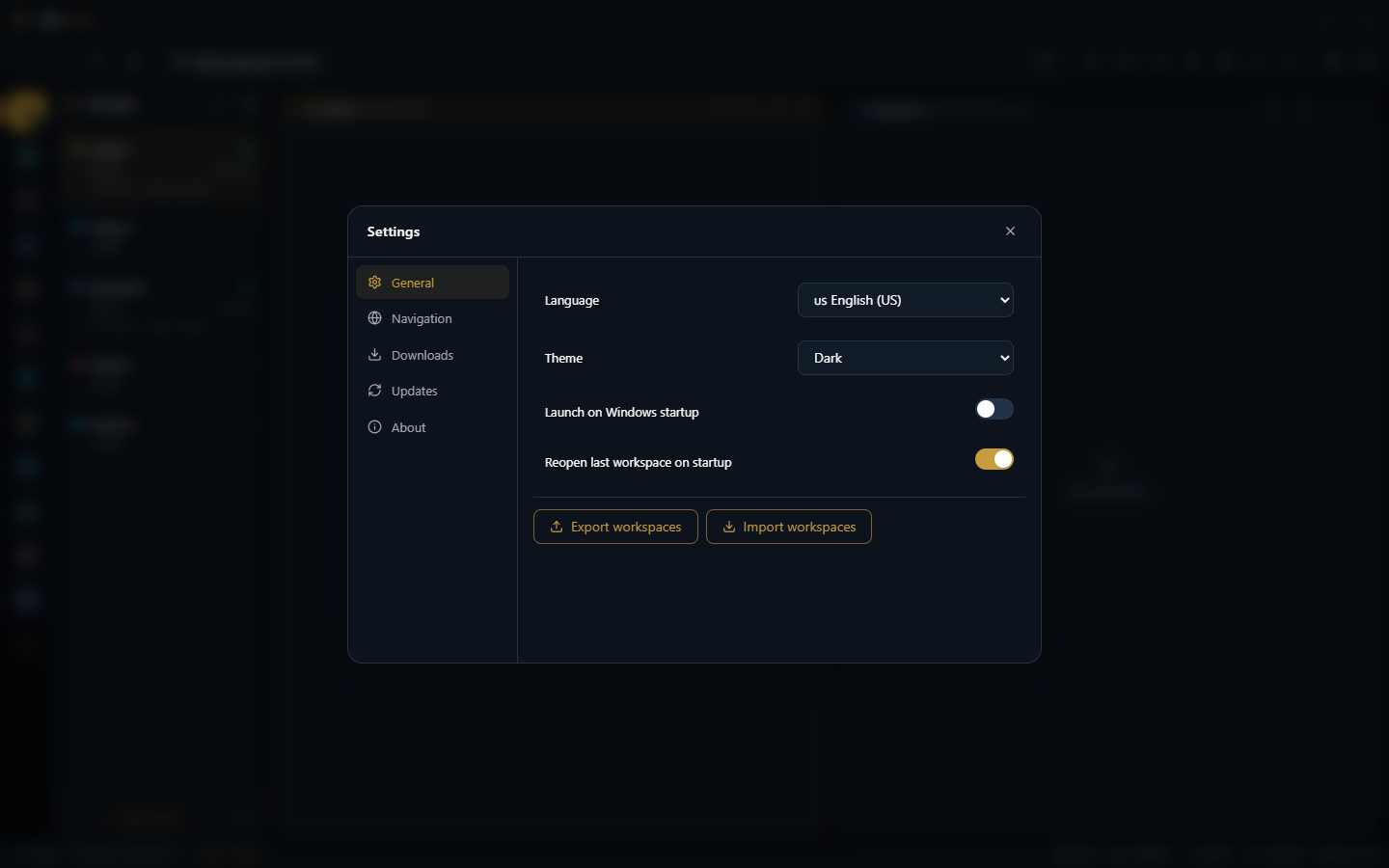
Theme, language, launch on Windows, reopen the last workspace, and export/import everything in one click.
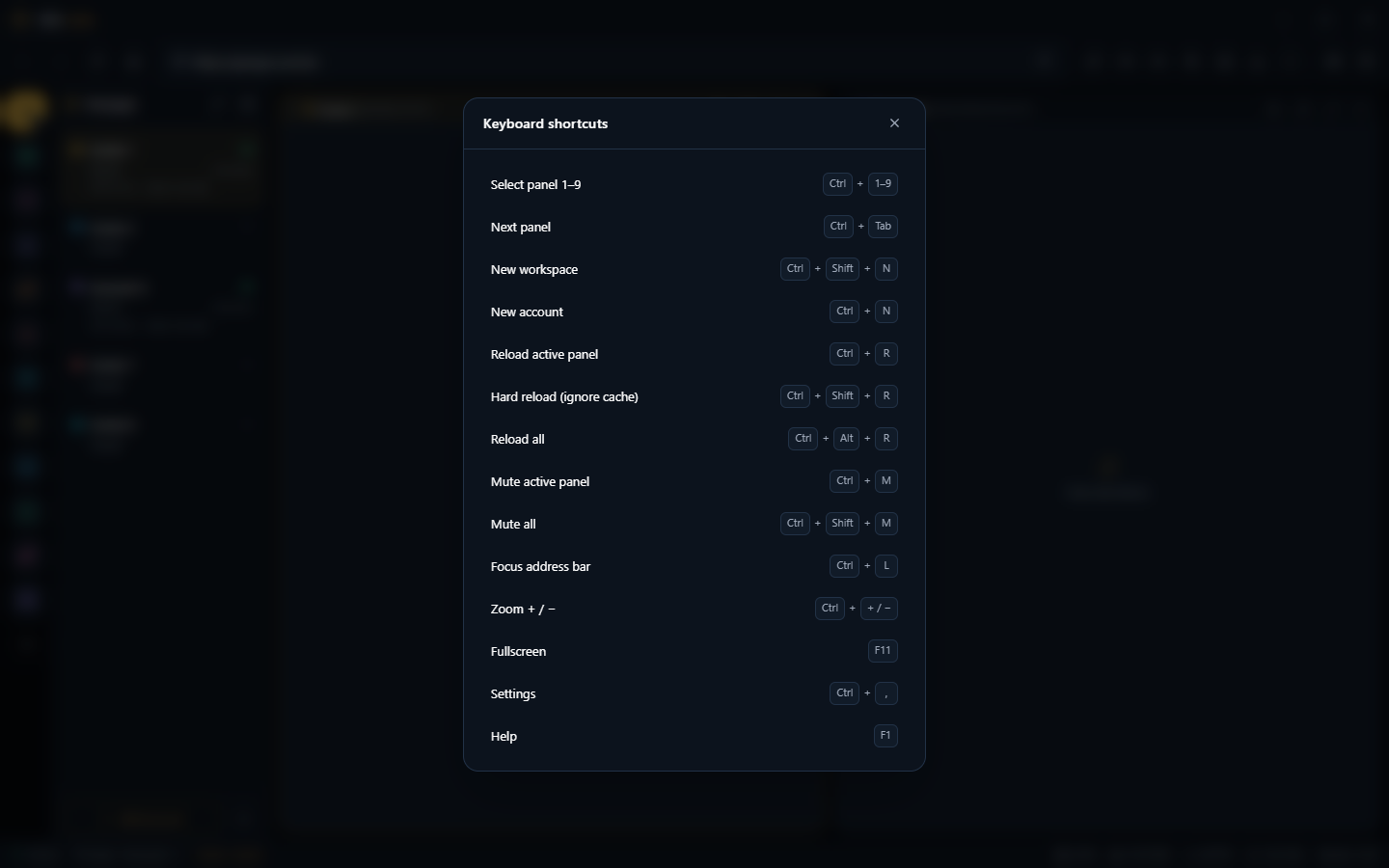
Built for the keyboard: switch panels, reload, mute, zoom and more — it all has a shortcut.
Two accounts of the same game open at once, each on its own login — without one interfering with the other.
Demo
See it in action
Demo video — coming soon.
Comparison
Idle Labs vs. a regular browser
Pricing
Full license for R$ 20.
Try it free for 8 hours first. Then unlock full access with a one-time payment.
Frequently asked
What people usually ask
What is Idle Labs?
A desktop browser built to run several accounts of the same site or game at once, each in a fully separate session, inside a single window.
Do I need an account per tab?
Each panel is an independent account: its own login, cookies, cache and storage. No account can see another.
How many accounts can I open?
As many as you want. You organize them into workspaces (categories) and pick the layout — 2, 4, 6 panels side by side or an auto grid.
Does it work with any site?
It works like a Chromium-based browser. Compatibility depends on each service, and usage must comply with its terms and rules.
Is it heavy? Will it freeze my PC?
Each account runs in its own process. In our test, 6 active accounts ran at 46 FPS using ~1.1 GB total. You can watch each account’s CPU and RAM.
How does the license work?
The license is tied to your account and your computers. You don’t get a key to type — you just sign in.
Can I switch computers?
Yes. In the client area you unbind a computer to free the seat and activate another. There’s a yearly limit on swaps.
I lost my PC / reformatted. Now what?
Open the client area in a browser, remove the old computer and activate the new one. Your purchases and license stay on your account.
Is it really a one-time payment?
Yes. The standard license costs R$ 20 in a single charge, with no monthly subscription.
Which payment methods?
PIX, credit card and digital wallets (Google Pay / Apple Pay), via Mercado Pago and Stripe.
Is payment secure?
Checkout runs on the payment provider — Idle Labs never sees or stores your card data.
How do I get updates?
The app tells you when a new version is out and updates itself. You can also see the history in the downloads area.
Does my data stay on my PC?
Yes. Settings, workspaces, accounts, cookies and cache stay local. The server only handles your account, license and devices.
Can you see my site passwords?
No. Cookies and sessions stay in the app’s local partitions and are not sent to the licensing server.
Is there a Mac or Linux version?
Today the installer is Windows-only. Other platforms may come based on community demand.
Can I use two computers at the same time?
Depends on your plan: each license has a device count. You can raise it with a bigger plan.
I forgot my password, now what?
You recover it through the client area, using your registered email.
Do I have to stay logged in?
Your login is stored securely on your computer and only revalidated with the server now and then.
Is there support?
Yes. Support is available in the official Discord community — it’s the fastest channel.
How do I ask questions before buying?
Reach out on Discord before buying. We’d rather sort it out by talking.
Join the community
Updates, support and the people who use Idle Labs every day.